Rolling Back the Years
Posted by Marieke Guy on June 3rd, 2010
I’ve been having a little play with MementoFox, a firefox addin that “links resources with their previous versions automatically, so can you see the web as it was in the past“.
Once you have installed the addin a little slider bar is added to your Firefox Web browser. When browsing any Web site you can use the slider bar to select a date on which you’d like to see the shown page. Momento will then look for the closest archived copy available. As you can see I have used MementoFox on the UKOLN home page.
Below is the page for around the time I started working at UKOLN – 10 years ago! The page here is taken from the Internet Archive Wayback machine.
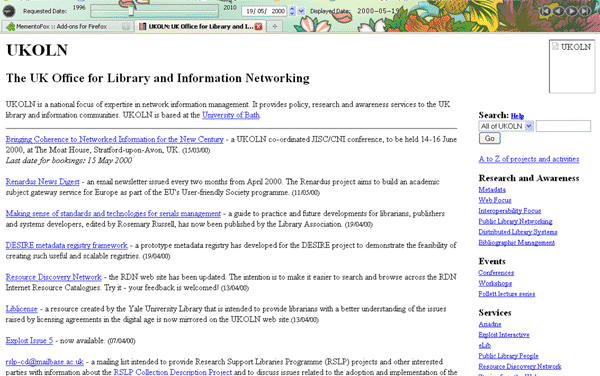
UKOLN Home page in 2000
And here is the page as it is now.
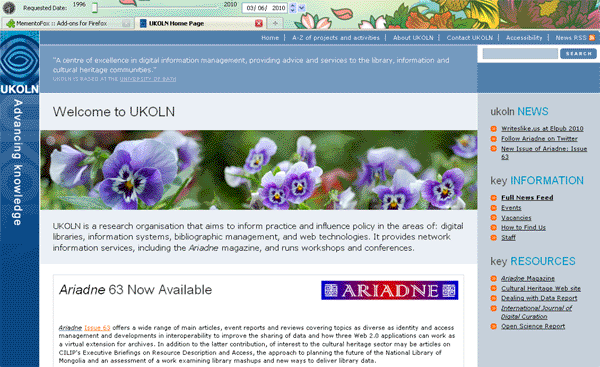
UKOLN Home page in 2010
I initially used version 0.8.6 of MementoFox and had a few problems with viewing embeds (of video, slides etc.) of blogs in Firefox. Version 0.8.7 seems to have sorted this out.
The Memento Project Web site is definitely worth taking a look at. There are various time traveling scenarios and walkthroughs and more information on where the project is going. The project “wants to make it as straightforward to access the Web of the past as it is to access the current Web.”

Memento slider bar
At this point, there aren’t any formal technical specifications detailing the Memento framework but we will get to that. For now, the information on this site should provide quite a good insight into how Memento is trying to change the Web by adding a time dimension to its most common protocol, HTTP…If you are interested in establishing a Web with a memory, please join the Memento Development Group.
Maybe in the future we’ll be able to switch our ‘time-versions’ of Web pages as easily as we switch our blog themes.