
What Can OPML Offer?
Posted by Brian Kelly on April 17th, 2009
The importance of RSS as a format for allowing content to be syndicated, embedded on other Web sites and easily viewed on mobile devices has been emphasised at UKOLN workshops for the cultural heritage sector. But what if you make use of an RSS reader (such as, say, Netvibes or Pageflakes) and wish to move to an alternative RSS tool (such as, say, Feedreader or NetNewsWire). You may wish to do this because of preformance problems with your preferred RSS reader, because you’d prefer to make use of a desktop RSS reader rather than a Web-based tool or because you wish to read RSS feeds on an iPhone or iPod Touch device and wish to integrate this will a desktop client.
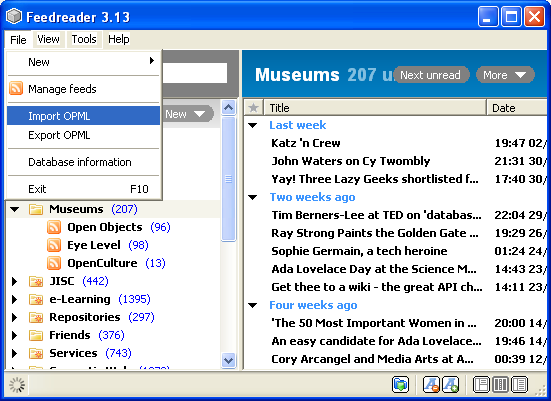 OPML (Outline Processor Markup Language) provides an import and export format for RSS readers, allowing groups of RSS feeds to be moved between RSS tools without the need for the time-consuming process of manually adding feeds if you wish to use (or perhaps just evaluate) a new tool.
An example of how this can be achieved is illustrated in the two accompanying images.
The first image shows the File menu in the Feedreader desktop RSS reader. The menu contains items for both importing and exporting an OPML file.
If Feedreader is your current RSS reader you can export the RSS feeds (and corresponding structure of the folders used to manage such feeds) to an OPML file.
 The second image shows how an OPML file can be imported into a different RSS reader. In this case the import and export functions of the Web-based Google Reader are shown.
Easy, isn’t it?